
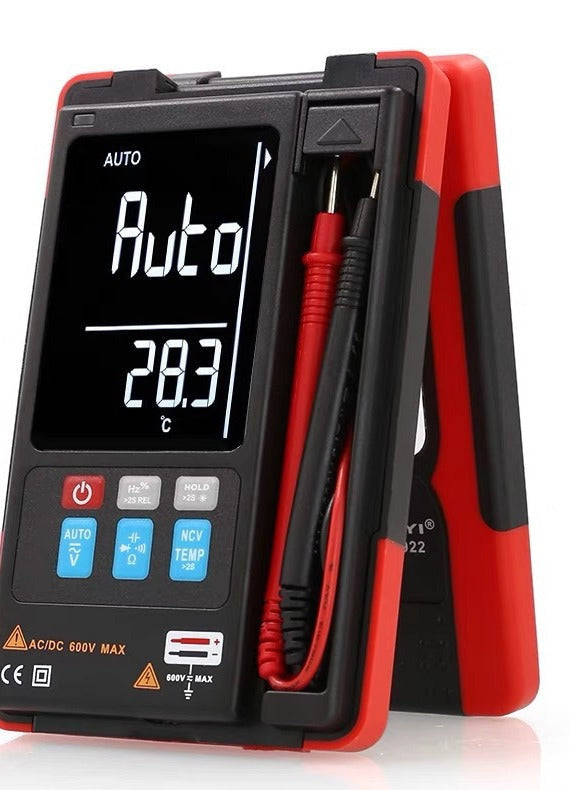
The ZOYI ZT922 and ZT933S share a purchase page, but voice interaction belongs to the ZT933S. The ZT922 is the non-voice option. If you want spoken readouts because looking between a test point and a screen is awkward, start by selecting the correct version.
The useful question is then how to attach each spoken value to the correct measurement. Hearing a number is convenient; remembering which two points produced it is still part of the job.

ZOYI ZT922 or ZT933S supplier product image. Screen values and accessory layouts are illustrative; confirm the selected version.
Give the test points names
Consider an appropriate low-voltage electronics task with a common reference and several accessible points. Label the intended points on a photograph or sketch before taking readings. Use names such as supply input, regulator output and sensor supply, rather than relying on the order in which you touched them.
Choose the function and connection from the exact-model manual. Confirm the units and selected mode on the display. The published product description does not provide a complete range, accuracy or voice-command specification, so do not assume that a spoken readout establishes any of those details.
Reddit electronics discussions describe the awkwardness of looking at the screen and joint at the same time. Voice may help with that particular attention problem. It does not hold the probes, prevent a slip or establish that the contact is on the intended conductor.
Test the communication before the circuit
Check the voice behaviour on a suitable known low-voltage reference before starting the actual sequence. Confirm what is spoken, when it updates and whether the screen and speech refer to the same observation. Record any behaviour you need to allow for, such as an announcement arriving after you move a probe.
Keep your first sequence short. Say or write the point name, establish stable contact, check the display and record the result with its unit. If an announcement is ambiguous, repeat that named point rather than assigning the number to the next point from memory. Background noise and another person speaking can make a spoken record harder to interpret.

Speech does not verify probe contact or replace the screen check.
Preserve the result outside the announcement
A compact table needs a point name, circuit state, displayed value, unit and any qualification about contact or stability. A note saying only “five, five, zero” is not useful later: it has lost the units, locations and possibly the meaning of the last reading.
For repeated work, run through the same named points in the same order. Compare unexpected results with the screen and an appropriate reference check. Do not treat voice interaction as independent verification of the measurement.
The ZT933S is worth considering when spoken information fits your working method. The ZT922 remains the version to select when you want the non-voice option. In either case, a clear point map turns a convenient readout into an interpretable test record.
For the current specification and supplied version, see the ZOYI ZT922 or ZT933S product page.
For the related product overview, see the ZOYI ZT922 / ZT933S Learn More page.