
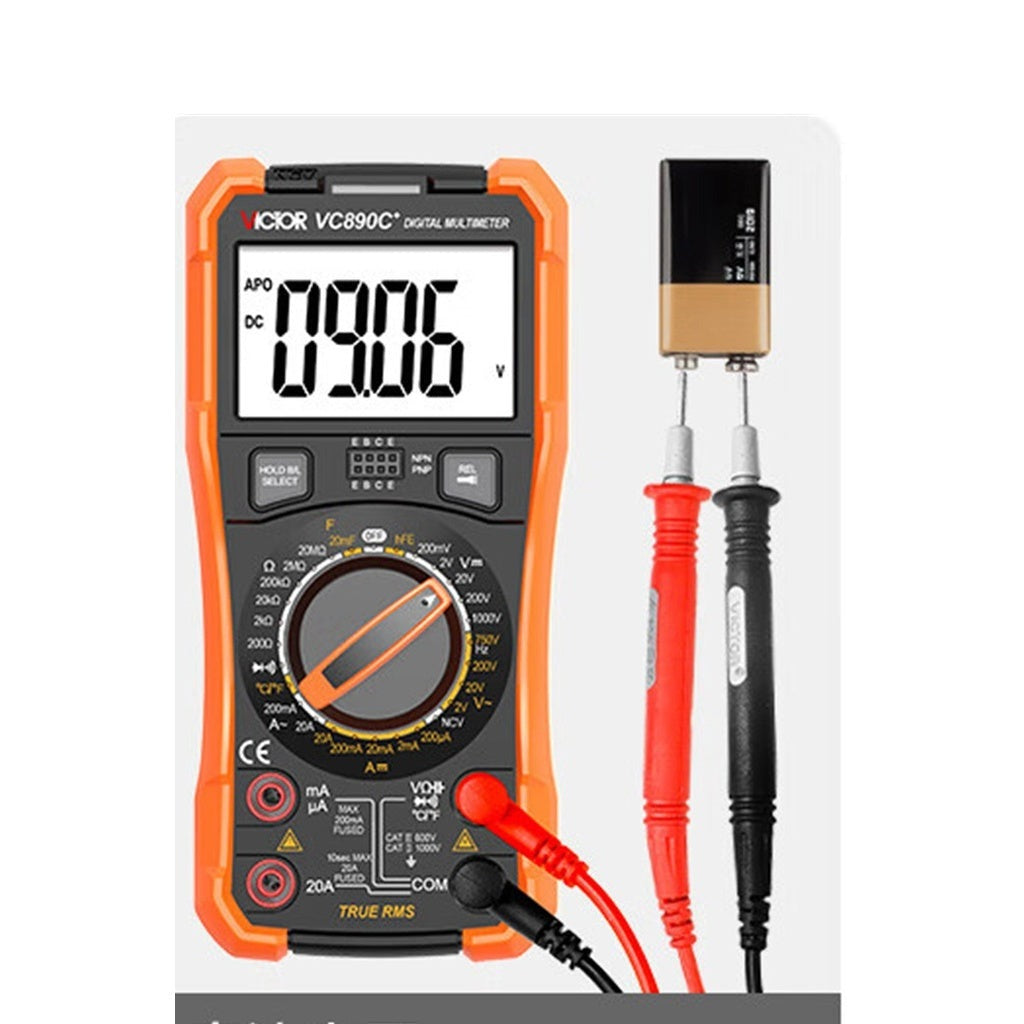
A VICTOR VC890C+ manual-range multimeter can make a battery voltage easy to read once the range is chosen deliberately. It cannot turn a precise-looking display into a complete battery health test. Separate three questions: is the measurement setup correct, what voltage was observed, and what does that observation actually establish about the battery?

Product-page battery-check illustration. Match the voltage mode, lead sockets and polarity before touching the terminals.
Treat the range as part of the result
The VC890C+ uses manual ranging and lists AC/DC voltage alongside other functions. For a suitable low-energy battery check, choose the DC-voltage function and a range above the expected voltage, following the actual dial and manual. Do not choose an AC-current or resistance position because its number looks similar.
If the source is genuinely unknown, the task may need more than a conservative range choice. Establish its nature and suitability before connecting. This guide's example concerns familiar small batteries, not unidentified supplies or live installations.
A range that is too high may hide useful digits; one that is too low may produce an overrange indication. Moving to a more informative range is sensible only within the instrument's specified use. An overrange indication must not be interpreted as zero voltage.
Confirm sockets before touching the battery
Check the leads, their insulation and the meter's input labels. Use COM and the designated voltage input as described by the manual. The VC890C+ has separate current inputs; leaving a lead in a current socket after a previous task is an important setup error to catch.
For a voltage check, the probes go across the suitable battery terminals. Do not put the meter in a current configuration across a battery. Even a compact battery can deliver damaging fault current if shorted. Keep exposed tips from bridging terminals or adjacent conductive parts.
Observe polarity and make stable contact without crushing, puncturing or dismantling the battery. A negative sign in the correct DC-voltage function may simply mean the probe orientation is reversed relative to the inputs. Remove the probes before changing the connection or task.
Do not confuse resolution with accuracy
Suppose a hypothetical manual meter shows a battery as 1.5 V on a coarse range and 1.49 V on a finer range. The extra digit provides a more detailed display; it does not establish that the second observation is accurate to 0.01 V. This example illustrates the concept and does not assign those exact displays or ranges to the VC890C+.
For a numerical judgement, consult the exact model's DC accuracy, range and digit terms. Contact quality, battery temperature and the battery's own state can also change the result. True RMS, which the VC890C+ lists for AC readings, does not validate a DC battery health decision or remove these uncertainties.
Record the selected function and range alongside the value. A later reader should not have to reconstruct them from a cropped photograph of the digits.
Distinguish unloaded voltage from useful capacity
A battery can show a plausible unloaded voltage and still perform poorly in its intended device. Conversely, different chemistries and states of charge do not share one universal voltage threshold. Identify the battery type and use the manufacturer's relevant test method or a suitable battery tester when capacity or load performance matters.
If an approved procedure calls for a load measurement, the load, connection, duration and battery condition become part of that procedure. Do not invent a load by shorting the terminals through the meter or an unsuitable resistor. A simple open-circuit check is valuable, but its limitation should remain explicit.
Keep a compact comparison worksheet
For each observation, note the battery identifier and chemistry, date, approximate temperature, whether it was resting or under an approved load, the meter function/range, measured voltage and any unstable contact. Compare like conditions rather than ranking batteries by the last displayed digit.
Confirm the body is VC890C+, not VC890D or a differently bundled VC890C++ listing. The result becomes useful when the model, setup and battery condition travel with the number. For range, function and instrument choices, see our multimeter buying guide.
Explore the VICTOR VC890C+
See its functions, suitable tasks and key limits before choosing.