
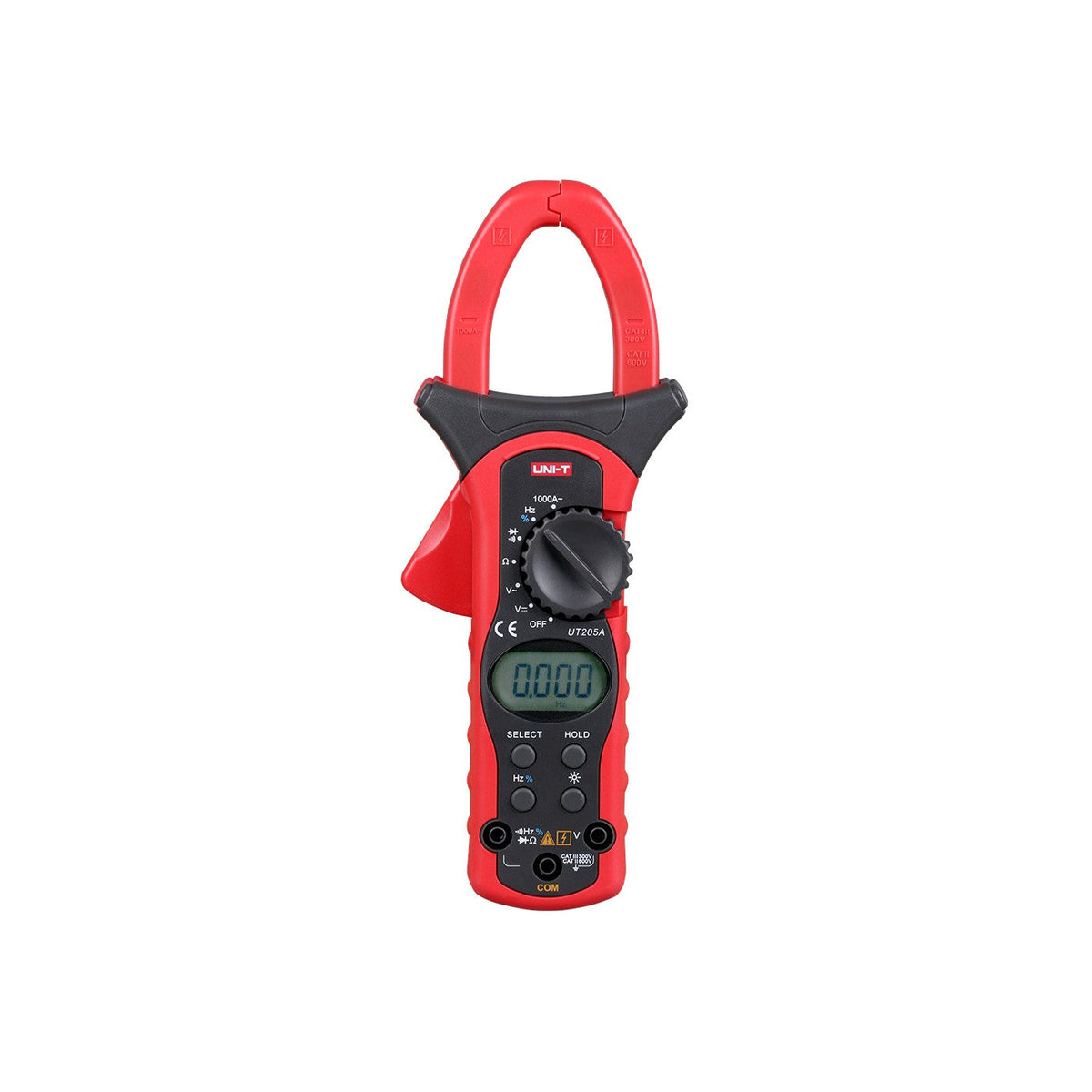
“Full auto” is easy to confuse with “any dial position is already reading clamp amps.” The UNI-T UT205A is a full-auto-range digital clamp meter with listed 1000 A AC, face silk UT205A, English UI example 0.000 / Hz, face keys SELECT / HOLD / Hz % / backlight, and rotary AC position 1000 A~. Before the jaw closes — and before you treat a frequency-style screen as an amp reading — confirm the dial is on 1000 A~, then measure one suitable conductor.
A near-zero reading on a twin-and-earth bundle is usually cancelled go-and-return, not proof that the circuit is idle.
Begin with the dial position, not the auto-range label
The sourcing title and handoff describe this UT205A as full auto range. That describes ranging behaviour inside a selected function — it does not replace setting 1000 A~ for clamp current. Leave OFF until access is safe; do not browse ohms / Hz around a live conductor you have already clamped unless that is the documented task.
Jaw / face silk on this exact UT205A capture also lists CAT III 300 V and CAT II 600 V. A 1000 A~ dial position describes current capacity; it does not raise the installation category. Do not borrow CAT III 600 V wording from UT216* / UT213B pages.
Set 1000 A~ before the jaw closes
- 1. Confirm the expected current sits inside the listed 1000 A AC span for this model.
- 2. Turn the dial to 1000 A~ when you are ready for the clamp path.
- 3. Open the jaw only when access is safe, then close fully around the single conductor.
- 4. Wait for a stable reading. Use face HOLD if you need to move your eyes or body away from the conductor to note the value.
- 5. Use SELECT or Hz % only as the manual describes for the selected function — they are not substitutes for picking 1000 A~ or for safe isolation.
No True RMS or NCV claim is made on this page. Do not invent those behaviours from UT216 / UT213B / UT200 pages. Follow the manual’s accuracy conditions for the waveform, function and range you intend to measure.
Read 0.000 / Hz as a frequency-path UI example
English UI on this exact face shows 0.000 with Hz. That is a frequency-path readout style — not a screen-size claim and not, by itself, a clamp-amps reading. Voltage, resistance / diode / continuity and frequency / duty use the documented dial positions and the COM / measurement jacks as marked, plus SELECT as the manual describes.
Do not paste the bare UT205 UI example 399.9 / DC / AUTO / mV or its side HOLD layout onto this guide. This page is UT205A only.
Keep HOLD in proportion
Face HOLD freezes a display value so you can step back — it does not make a live conductor safe. Match leads, PPE and competence to the task. The jaw / face markings include CAT III 300 V and CAT II 600 V on this capture; still confirm the manual’s category statements for the function you are using.
Choose the UT205A when full-auto 1000 A AC fits
For buyers searching for a 1000 A AC full-auto-range clamp meter with 3999 counts, English face controls and UI example 0.000 / Hz, the UT205A is a clear shortlist candidate. Still check access, uncertainty and event type. This page is UT205A only — not the bare UT205 (£84.01 sibling), not UT205A+ (same-batch pending), not UT205B (rejected watermark sibling), not UT205E, not UT216A/B/C and not UT200A+/UT200B+. Do not use factory 205 / A+ / B / E combo posters.
For product context before you buy, see the UNI-T UT205A overview and the buying page (£80.81, free UK delivery). Always follow the supplied manual for ranges, accuracy conditions and measurement-category limits. Jaw opening size, numeric accuracy tolerances and battery chemistry are not invented in this guide — use the manual and the markings on your unit.