
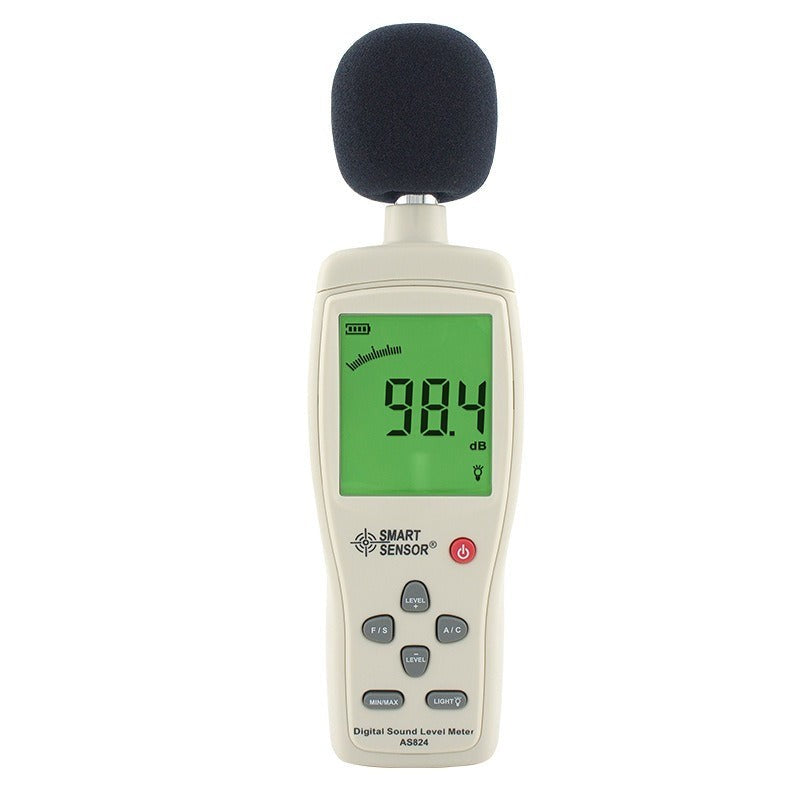
The Smart Sensor AS824 sound level meter can help compare a room with a fan or computer running and stopped. It cannot prove that a quiet home studio is silent simply because the display reaches its lower measurement limit. The AS824 lists 30–130 dBA and 35–135 dBC ranges, so the low end matters as much as the loudest level it can show.
Start by defining the comparison and checking whether the room is within the instrument's useful measurement range.

The AS824 has a listed 30 dBA lower range limit; a low display cannot establish an arbitrarily quiet room.
Separate room background from recording-system noise
In home-studio discussions, noise floor can mean acoustic background in the room or electrical/digital noise in the recording chain. A handheld sound pressure level meter measures the acoustic situation at its microphone. It does not directly measure an audio interface's noise floor in dBFS.
For a fan comparison, choose a representative microphone position near the listening or recording location. Record the distance, orientation, doors, windows and other equipment. Keep your body from altering the sound field unnecessarily, and use the instrument and any suitable windscreen as directed.
The purpose is a repeatable comparison, not finding the one corner that gives the lowest reading.
Keep weighting and response unchanged
The AS824 provides A/C frequency weighting and Fast/Slow response. A weighting and C weighting emphasise frequencies differently; Fast and Slow describe time response. Neither choice alone converts the instrument into a complete exposure or spectral analyser.
For a steady comparison, choose the setting appropriate to the task and retain it for both conditions. Record it with the value, for example as an A-weighted observation with the selected response. A number written only as “42 dB” leaves out information needed to reproduce it.
The reviewed AS824 does not establish LAeq measurement, personal noise dose or onboard unattended logging. MAX/MIN and analogue outputs should not be relabelled as those functions.
Measure the background before attributing the fan
Take a baseline with the target source stopped where safe and practical. Then operate it in the defined state and observe the combined level. Record other sources that change during the session, such as traffic, heating or a refrigerator.
Decibels cannot be subtracted as ordinary linear quantities to isolate a source. If the room is 35 dBA without the fan and 38 dBA with it, the fan's level is not 3 dBA. Under appropriate stable, independent-source assumptions, two equal 35 dBA contributions combine to about 38 dBA. That is an explanatory example, not a measurement made with this AS824.

Illustrative acoustic addition only. Real source attribution requires stable conditions, suitable range and an appropriate method.
Respect the lower measurement limit
If the baseline is near or below the listed 30 dBA lower limit, the instrument may not resolve the quiet background with the confidence needed for a fine comparison. A repeated low display is not proof that the room meets a 20 dBA target or that no acoustic noise is present.
Likewise, a small difference must be considered alongside the listed ±1.5 dB accuracy conditions, repeatability and changes in the room. The 0.1 dB display resolution does not mean every tenth of a decibel is a meaningful improvement.
For a very quiet studio requirement, choose an instrument and measurement method with suitable self-noise, lower-range performance and calibration evidence. A product's historical design-standard wording is not independent proof of current certification.
Change one thing and repeat
Compare one controlled change at a time: fan speed, equipment position or an approved vibration-isolation measure. Retain ventilation and manufacturer clearance requirements; reducing noise by obstructing cooling can damage equipment.
Repeat the baseline if the room conditions have changed. Keep individual observations and the settings with them rather than reporting only the best result. If the remaining problem is a tonal hum or a narrow-frequency whine, a suitable spectral assessment may be needed; one overall level does not fully describe how the sound is perceived.
The Smart Sensor AS824 product page covers the current meter and analogue-output features. Our environmental-measurement guide provides wider context. The useful result is a supported comparison within the meter's range, with the room background and unresolved limitations clearly identified.
Explore the Smart Sensor AS824
See its functions, suitable tasks and key limits before choosing.