
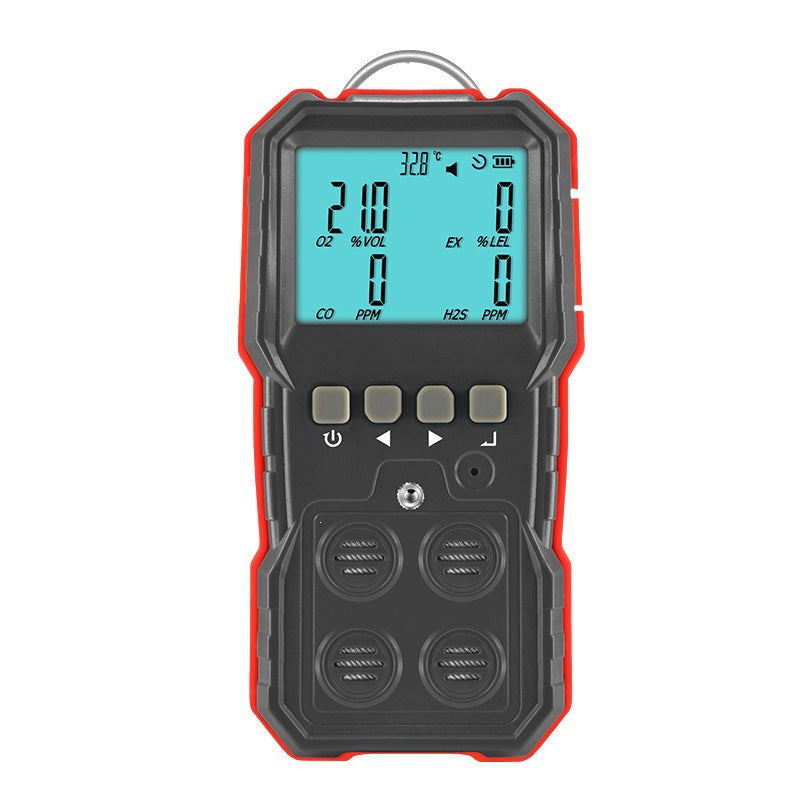
The Wintact WT8812 puts four gas readings on a backlit monochrome LCD. Before handing it to another trained user, check whether that person can read the complete screen in the intended working arrangement. A visible large number is less useful if its gas label, unit or status is obscured.
This is the black-and-white-screen model. Instructions or photographs for the colour-screen WT8811 should not fill gaps in the WT8812's documentation.

Wintact WT8812 supplier product image. Screen values and accessory layouts are illustrative; confirm the selected version.
Check the view from the user's actual position
In a permitted safe preparation area, arrange the instrument as it will be viewed. Check the screen from the likely angle and distance, with the relevant lighting and any required protective equipment. Look for reflections, blocked labels or a carrying position that turns the display away from the user.
The listing includes a metal hanging clip, but that alone does not establish that every clipped position is suitable. Follow the mounting and sampling instructions, keep required sensor openings clear and make sure the chosen arrangement does not obstruct the instrument's intended operation.
Read labels and status as well as digits
The screen presents oxygen in %VOL, combustible gas in %LEL, and carbon monoxide and hydrogen sulphide in ppm. Ask the receiving user to identify each field rather than relying on an assumed screen order remembered from another meter.
Backlighting helps visibility; it does not prove that the displayed observation is valid. Confirm the meaning of any status, fault or held-reading indication in the exact instructions. Do not invent a hold function merely because another four-gas meter has one.

A readable monochrome screen does not prove instrument readiness.
Rehearse only the documented controls
Four-button operation is listed, but the product description does not supply a complete button map, lock sequence or alarm-setting procedure. Obtain that information before the handover. Confirm how the user returns to the required measurement display without changing settings unintentionally.
Keep configuration changes controlled and recorded. Do not alter an alarm threshold simply to make a demonstration quieter. If a required setting or control behaviour cannot be verified, resolve it through the appropriate instructions or support before assigning the instrument to that task.
Complete readiness separately from readability
When specifying an LEL gas detector as part of a four-gas requirement, confirm the gas calibration, suitability and prescribed checks. A “bump test” is a documented response check; seeing plausible digits after powering on is not that check or a calibration.
A useful handover therefore has two outcomes: the receiving user can read and operate the confirmed WT8812 interface, and the required readiness and suitability records are available. The first outcome cannot stand in for the second. Neither a clear monochrome screen nor a quiet alarm authorises entry into a hazardous space.
For the current specification and supplied version, see the Wintact WT8812 product page.
For the related product overview, see the Wintact WT8812 Learn More page.